What is MCP? Hosts, clients, servers and tools in plain English
The Model Context Protocol lets AI apps connect to your files, code and work tools through one standard. Here is what host, client, server, tool, resource and prompt mean, how local and remote servers differ, and how to connect them safely.
The Model Context Protocol (MCP) is an open standard for connecting AI apps to other software. Instead of every assistant building its own plug-in for every tool, a tool is wrapped once as an MCP server, and any app that speaks MCP can use it: to read your files, query a database, look up a calendar or file a ticket. The idea is the same as a USB port. The shape of the connection is agreed in advance, so one side does not need to know how the other was built.
Checked against: the MCP specification, version 2026-07-28 (the current version on modelcontextprotocol.io at the time of writing). This guide explains concepts only, so it has no client-specific steps.
Why MCP exists
An AI model on its own only knows what is in its training data and in your conversation. To be useful at work it needs your current documents, your codebase, your tickets. Before MCP, each AI app connected to each service in its own way, so a connector written for one assistant did nothing for another.
MCP was first published by Anthropic in November 2024 as an open protocol, and its specification and official SDKs are developed in the open on GitHub. The specification says it takes some of its inspiration from the Language Server Protocol, which did the same job for code editors: write language support once, and every editor that speaks the protocol can use it.
The three parts: host, client and server
Most confusion about MCP comes from three words that sound alike. Here is what each one means.

The host is the AI app you actually use: a chat app, a code editor or a command-line assistant. It holds the conversation, talks to the model and decides what each connection is allowed to do. The specification puts consent here: the host must get your permission before it shares your data with a server or runs a tool.
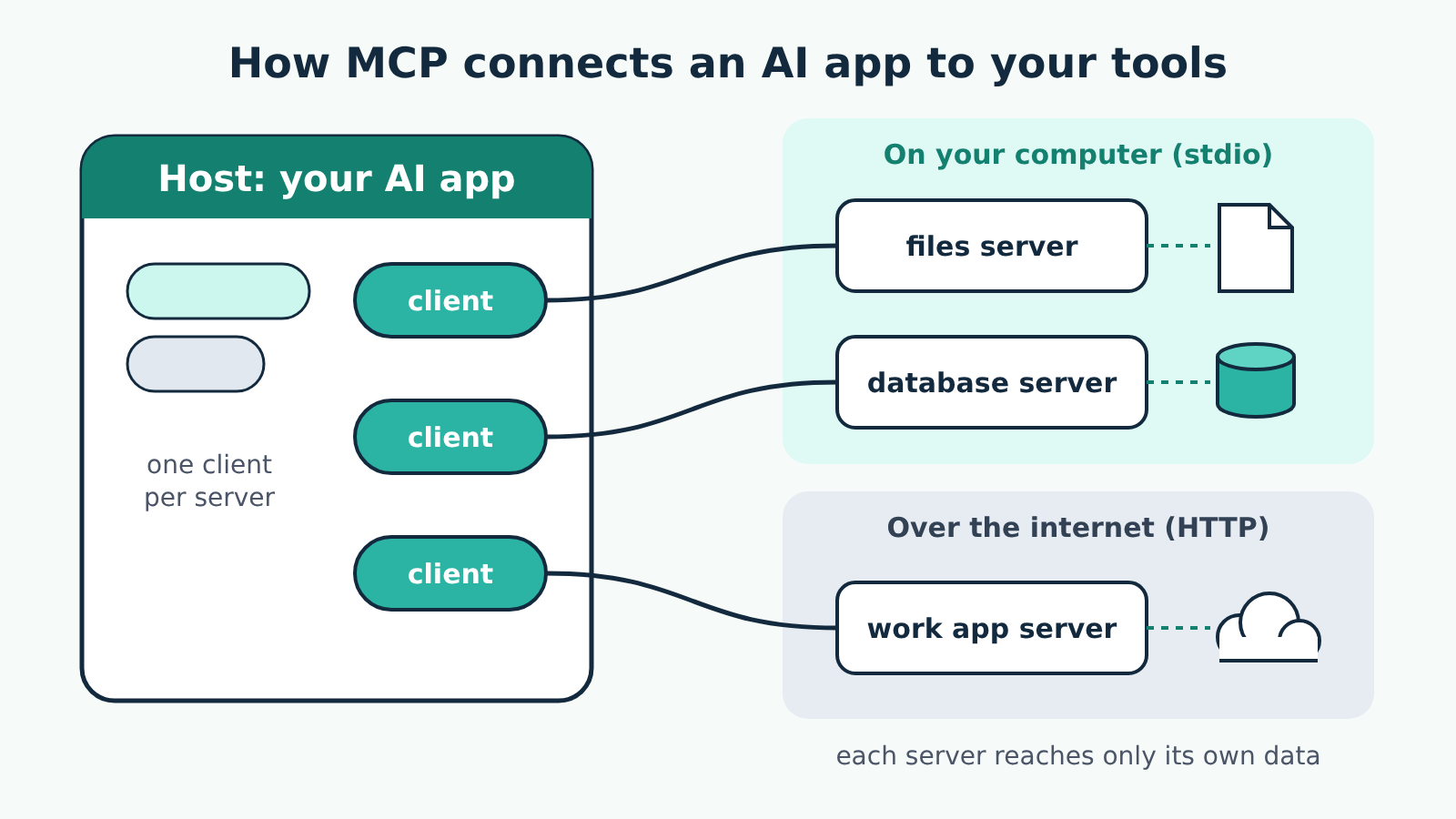
A client is the connector inside the host. Each client talks to exactly one server, so an app with three servers connected runs three clients. You rarely see clients directly, but the word matters because most apps describe themselves as "MCP clients" when they mean "this app can connect to MCP servers".
A server is the small program that wraps one tool or data source and offers it to the AI app. A files server can list and read files in folders you choose. A database server can run queries. The specification is clear that a server should get only the information it needs: the full conversation stays with the host, and one server cannot see into another.
What a server can offer
Servers offer three kinds of things, and the difference between them is who decides when they are used.
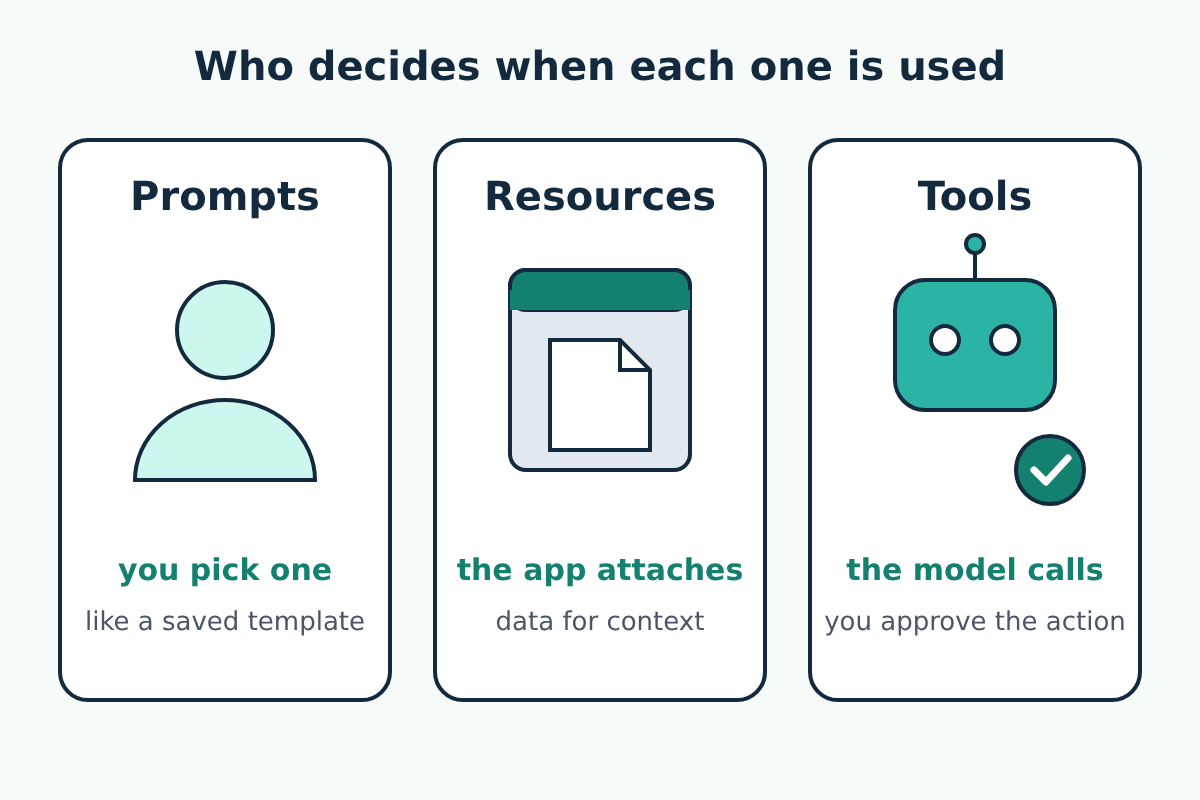
Tools are actions the model can take, such as "search issues", "create a file" or "run this query". The model decides when to call one, based on the tool's name and description. Because a tool can change things, the specification says there should always be a person able to refuse a tool call, and apps should show a confirmation before sensitive operations.
Resources are pieces of data a server makes available as context: the contents of a file, a database schema, a page of documentation. The app decides how to attach them; in many apps you choose them from a list.
Prompts are ready-made instructions a server offers, which you pick yourself, often as a slash command or a menu item. A code review server might offer a prompt that asks for a review in a fixed format.
There is also traffic in the other direction. A server can ask you for something it needs to finish a request, such as a missing detail or a confirmation; the specification calls this elicitation, and the host shows it to you as a question.
Local and remote servers
Servers come in two kinds, and the difference matters for both setup and safety.
A local server runs on your own computer. The AI app starts it as a separate program and talks to it through that program's input and output streams; the specification calls this the stdio transport. Local servers are typically set up by adding a command to the app's configuration file, and they run with your user account's permissions, so a files server can reach whatever you allow it to reach.
A remote server runs somewhere else and is reached at a web address over the Streamable HTTP transport. Remote servers are common for work apps where the data already lives online. They often ask you to sign in, and the specification's authorization rules for HTTP connections are built on OAuth, the same sign-in system many websites use when one app asks to access your account on another.
Versions, and why you will see dates
MCP versions are named by date. The first was 2024-11-05; the current one is 2026-07-28. Each version changes how clients and servers talk under the hood. The 2026-07-28 version, for example, made every request self-contained: each one now carries its own protocol version and capabilities instead of relying on a start-up handshake. Hosts, clients, servers, tools, resources and prompts mean the same in every version.
What matters to you is support. An app and a server have to share a version, and each app adds MCP features at its own pace, so a feature in the specification may not yet be in the app you use. Check the app's own documentation, and expect guides on this site to name the app version they were checked against.
Using MCP safely
Connecting a server gives an AI model a way to act on your behalf, so treat each one like installing software.
- Install servers only from sources you trust, such as the official reference servers or the vendor of the service, and read what each tool does.
- Give each server the least access it needs: one project folder rather than your whole home directory, a read-only database user rather than an admin account.
- Put API keys and tokens only where the app's or server's own documentation says to, never into the chat.
- Keep approval prompts switched on for tools that write, delete or send.
The less obvious risk is prompt injection. Whatever a tool returns, whether a web page, an email or a file, goes back to the model, and text in it can be written to look like instructions. A server that reads your inbox could pass along an email that tells the model to forward your files somewhere. The specification itself warns that tool descriptions should be treated as untrusted unless they come from a trusted server. Approval prompts and narrow permissions are what stop a planted instruction from turning into an action.
Where to start
Pick the AI app you already use and check its documentation for MCP support, then connect one low-risk server, such as a files server limited to a single test folder. The official site at modelcontextprotocol.io lists the reference servers and SDKs, and the specification is the source for every term in this guide.
