
The Git MCP server: tools, setup and the --repository setting
The official Git MCP server lets your AI app read diffs and history, stage and commit in local repositories. What its tools do, how to set it up, and how to confine it.
Checked against: mcp-server-git version 2026.10.28 on PyPI and its README in the modelcontextprotocol/servers repository, with the MCP specification version 2026-07-28. The README describes the server as early in development, so tool names and behaviour can change; check it before you rely on a detail here.
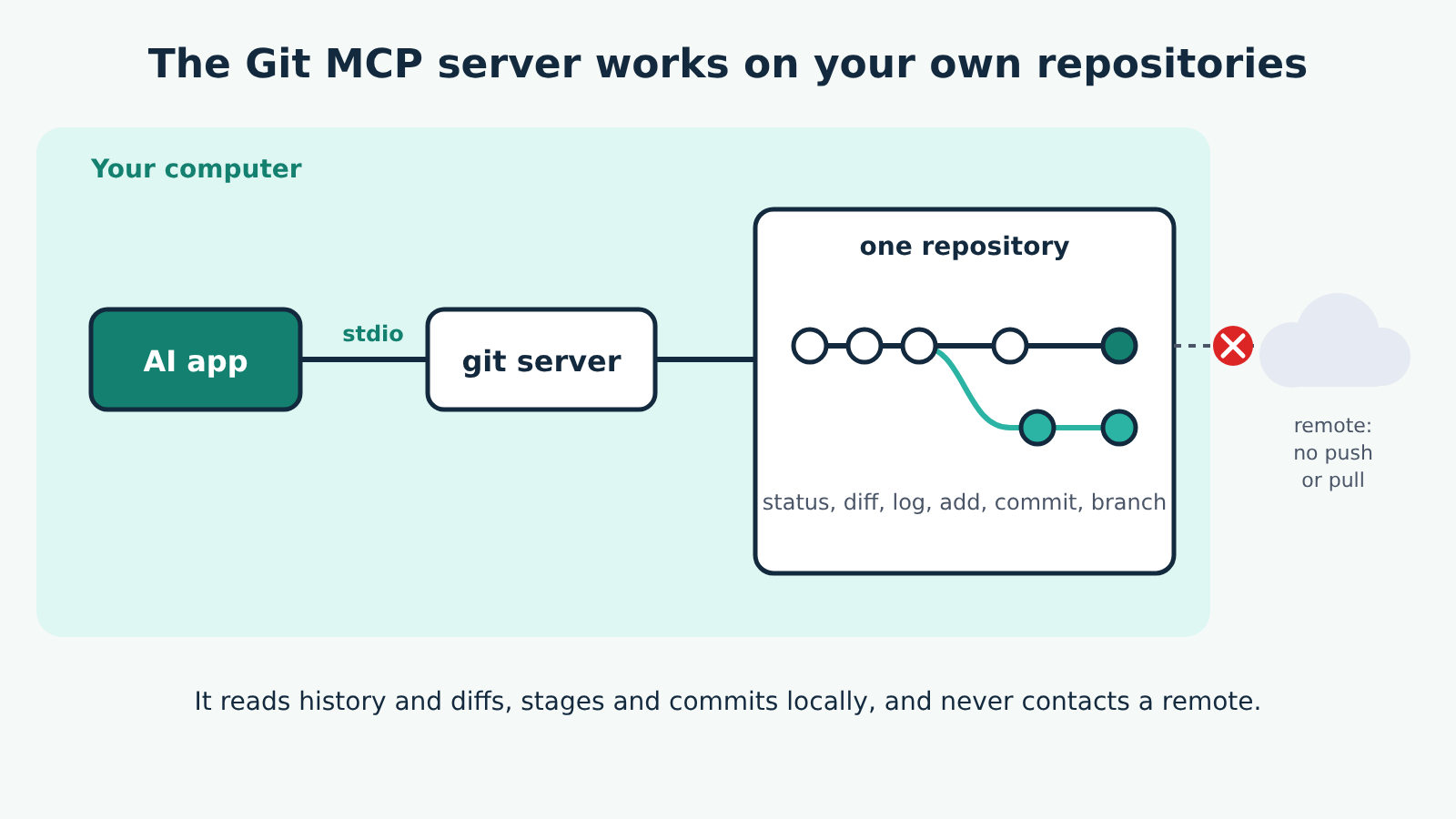
The Git MCP server lets your AI app read and change Git repositories on your computer: check status, read diffs and history, stage files, commit, and create or switch branches. It's one of the official reference servers, written in Python, and it runs locally: your AI app starts it as a program and talks to it over stdio, the standard input and output of that program. It doesn't push, pull or talk to GitHub. Everything happens in repositories on the machine where it runs.
The one setting that matters most is --repository. Without it, the server will work on any Git repository the server process can reach, so set it every time.
What the server can do
An MCP tool is an action the AI model can ask to run, usually with your approval. This server has twelve, and every one takes a repo_path naming the repository to work in.
Reading tools, which change nothing:
git_status: the working tree status.git_diff_unstagedandgit_diff_staged: changes not yet staged, and changes staged for the next commit.git_diff: the difference between the current state and a branch or commit.git_log: recent commits (10 by default), optionally between two dates. Dates can be ISO 8601, plain dates like2024-01-15, or relative ones like2 weeks ago.git_show: a commit, or a file or directory as it was at a given revision (for exampleHEAD:path/to/file).git_branch: local, remote or all branches, optionally only those that contain, or don't contain, a given commit.
Tools that change the repository:
git_add: stage the files you name;["."]stages everything.git_reset: unstage everything that's staged.git_commit: commit what's staged, with a message. It refuses if nothing is staged, asgit commitdoes, except while a merge is in progress, where the commit concludes the merge.git_create_branch: create a branch from the current one, or from a branch, tag or commit you name.git_checkout: switch to a branch. Given a commit or tag instead, it leaves you on a detachedHEADand says so.
There's no push, pull, fetch, merge, rebase or stash tool, and no tool that deletes files or branches. Those stay with you.
How --repository limits what it can touch
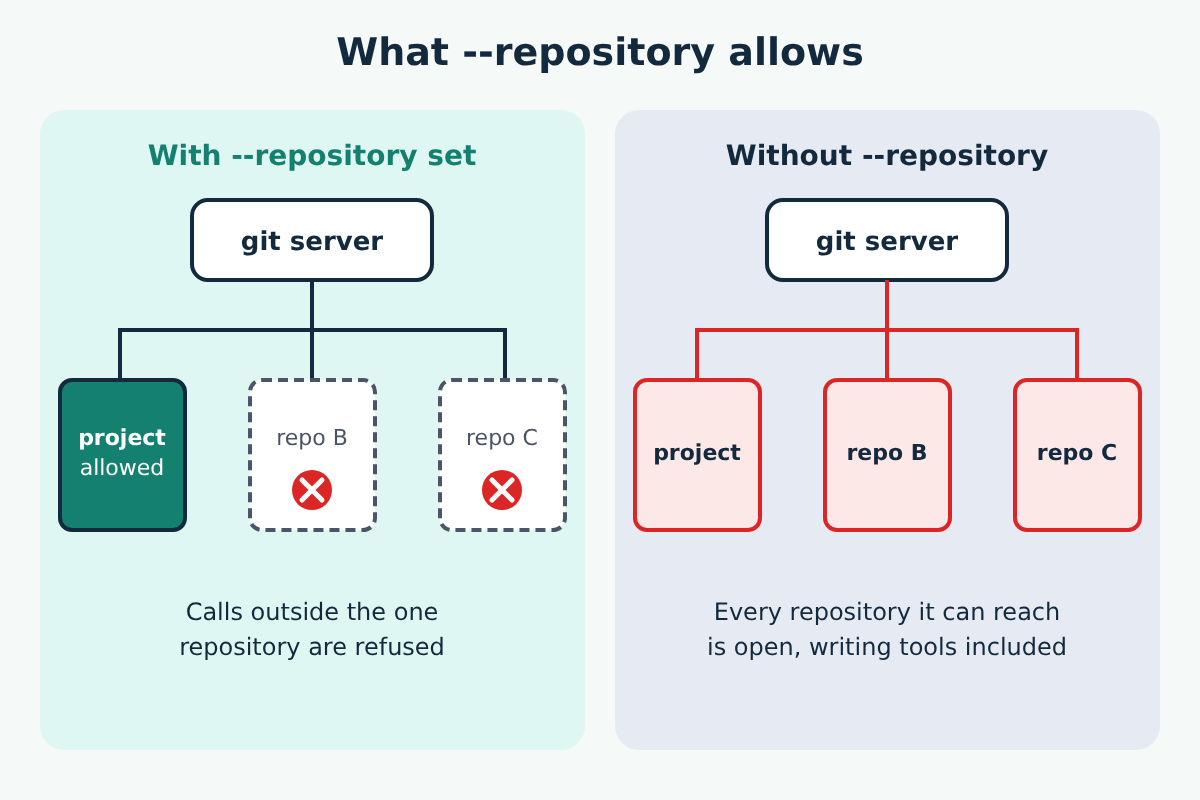
The README is blunt about this: without --repository, the server reads and writes any Git repository the server process can reach, and that includes git_add, git_commit, git_reset, git_create_branch and git_checkout. --repository is the only confinement the server offers. It never asks your AI app for a list of allowed folders (the protocol feature called roots), so nothing in your AI app's settings narrows it; only the flag does.
Two details are worth knowing:
--repositoryaccepts any path inside a Git working tree, and the server widens it to the whole enclosing repository, the waygit rev-parse --show-topleveldoes. Pointing it at a subfolder still allows tool calls anywhere in that repository.- Every tool call's
repo_pathmust be inside that repository, and so must the Git directories behind it. A nested repository whose.gitpoints somewhere outside is refused.
If the path you give doesn't exist or isn't inside a Git repository, the server logs a one-line error when it starts.
Setting it up
You need Python 3.10 or later. The README recommends running it with uvx, from the uv tool, which fetches and runs the package without a separate install step. Alternatively, pip install mcp-server-git and run it with python -m mcp_server_git.
For Claude Desktop, add this inside mcpServers in claude_desktop_config.json, replacing the path with your repository:
"mcpServers": {
  "git": {
    "command": "uvx",
    "args": ["mcp-server-git", "--repository", "path/to/git/repo"]
  }
}
With a pip install, use "command": "python" and "args": ["-m", "mcp_server_git", "--repository", "path/to/git/repo"]. Quit and reopen the app after saving.
For VS Code, the README points to the user mcp.json (Command Palette, MCP: Open User Configuration) or a .vscode/mcp.json in your workspace, where servers go under a servers key. Its example there leaves out --repository; add "--repository", "path/to/git/repo" to the args yourself. Zed and Zencoder setups are in the README too.
If the app can't start uvx, the cause is usually the same as with npx: the app can't find the program on its PATH. Our spawn npx ENOENT fix applies, with uvx in place of npx. To test the server on its own, the README suggests the MCP Inspector: npx @modelcontextprotocol/inspector uvx mcp-server-git.
Running it in Docker
The README also offers a Docker image, mcp/git. Docker narrows access differently: the container sees only the folders you mount into it with --mount. Mount only the repository you want it to work on, not your whole home folder as the quick example does.
What access it needs, and how to keep it narrow
The server runs as you. Inside the repository you allow, it can read every tracked and untracked file through diffs and git_show, read the whole history, stage, commit and move between branches. It needs no credentials or tokens, because it never contacts a remote.
To keep it narrow:
- Always set
--repository, one repository per server entry. Add a second entry with a different name if you need a second repository. - Leave approval prompts on for the writing tools, at least for
git_commitandgit_checkout. - Commit or stash your own work before a session, so anything the model stages or commits is easy to tell apart and to undo.
- Keep secrets out of the repository. A diff of an
.envfile is just text to the model.
Prompt injection through repository content
Commit messages, code comments, README files and diffs are all text the model reads. A repository you cloned from someone else can contain text written to look like instructions, such as a comment telling the assistant to commit something or check out another branch. That's prompt injection through tool output, and it's the reason the README says to set --repository whenever the server works with content that isn't fully trusted. With it set and approvals on, the worst an injected instruction can do is stay inside one repository and wait for your yes.
Limits worth knowing
- It's local only. There's no web address to connect to, so browser-based apps can't use it.
- It has no network operations. Push, pull and fetch happen in your own terminal or Git app.
- Tools that fail return an error the model can read and correct, in the form
Error executing tool <name>: <message>. That covers a bad revision, a path outside--repositoryand arguments that don't match the tool. - It speaks both current protocol versions: 2026-07-28, and 2025-11-25 for older clients. You don't configure this; the client's first request decides.
If you want your AI app to read files that aren't in a Git repository, use the filesystem server instead, which limits access to the folders you list.
