
The Memory MCP server: how it remembers, setup and what to keep out of it
The official Memory MCP server stores people, projects and facts in one local file so your AI app can recall them in later chats. How it works, how to set it up, and what not to store.
Checked against: @modelcontextprotocol/server-memory version 2.0.1 on npm and its README in the modelcontextprotocol/servers repository, with the MCP specification version 2026-07-28.
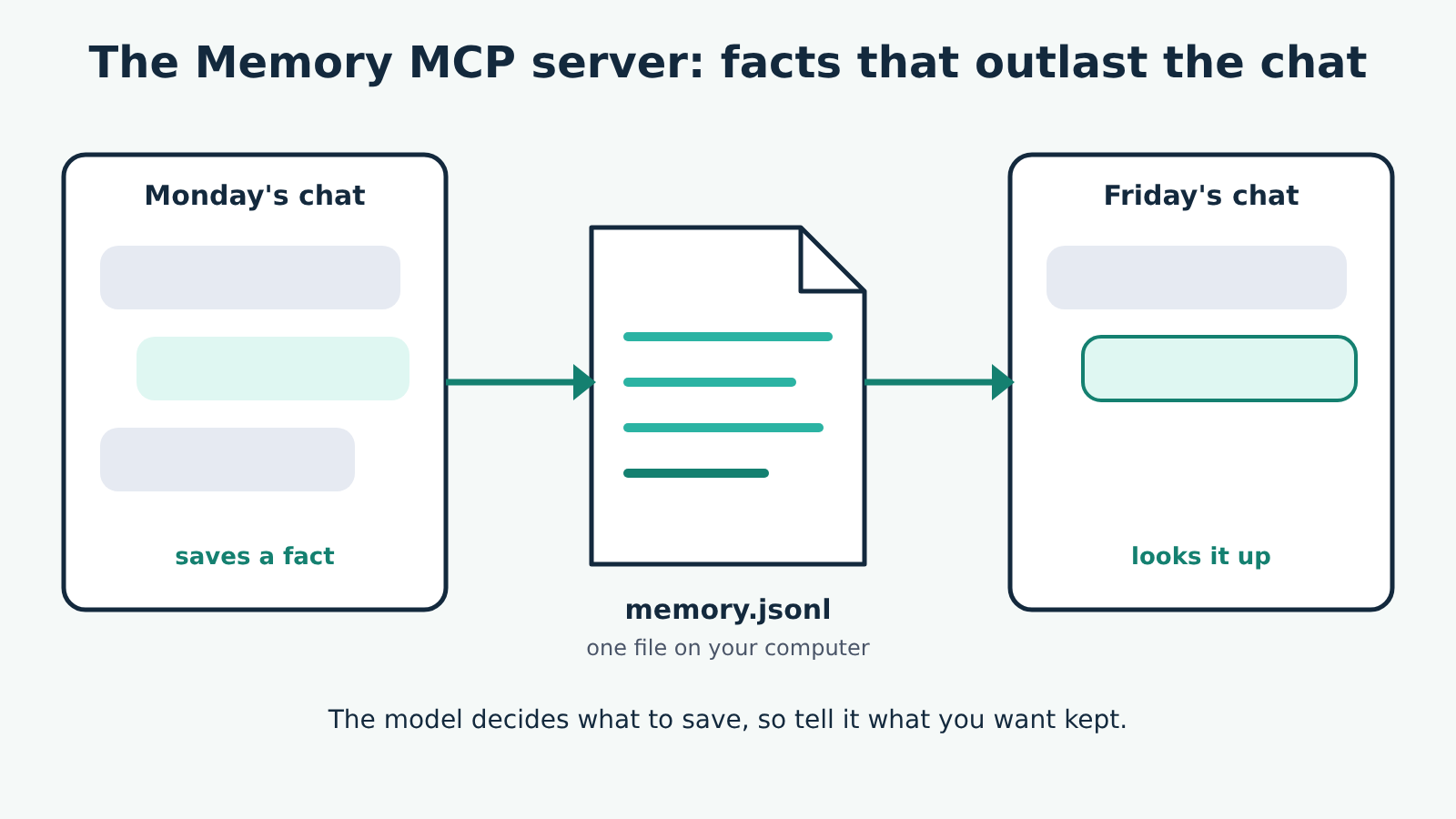
The Memory MCP server gives your AI app a notebook that outlasts the chat: it stores people, projects and facts in a small file on your computer and lets the model look them up in later conversations. It's one of the official reference servers. It runs locally (your AI app starts it as a program and talks to it over stdio, that program's standard input and output), needs no account or API key, and touches only one file.
What it doesn't do is decide on its own what to remember. The model chooses when to save and when to look things up, and it does that well only if you tell it how, which is the part most setups skip.
How the memory is organised
The README calls the store a knowledge graph. In plain terms it holds three kinds of thing:
- Entities are the things being remembered, each with a unique name and a type, such as a person, an organisation or a project.
- Relations connect two entities in one direction, written in active voice, such as
works_atormanages. - Observations are single facts attached to one entity, stored as short strings, such as "Prefers morning meetings". The README asks for one fact per observation, so each can be removed on its own.
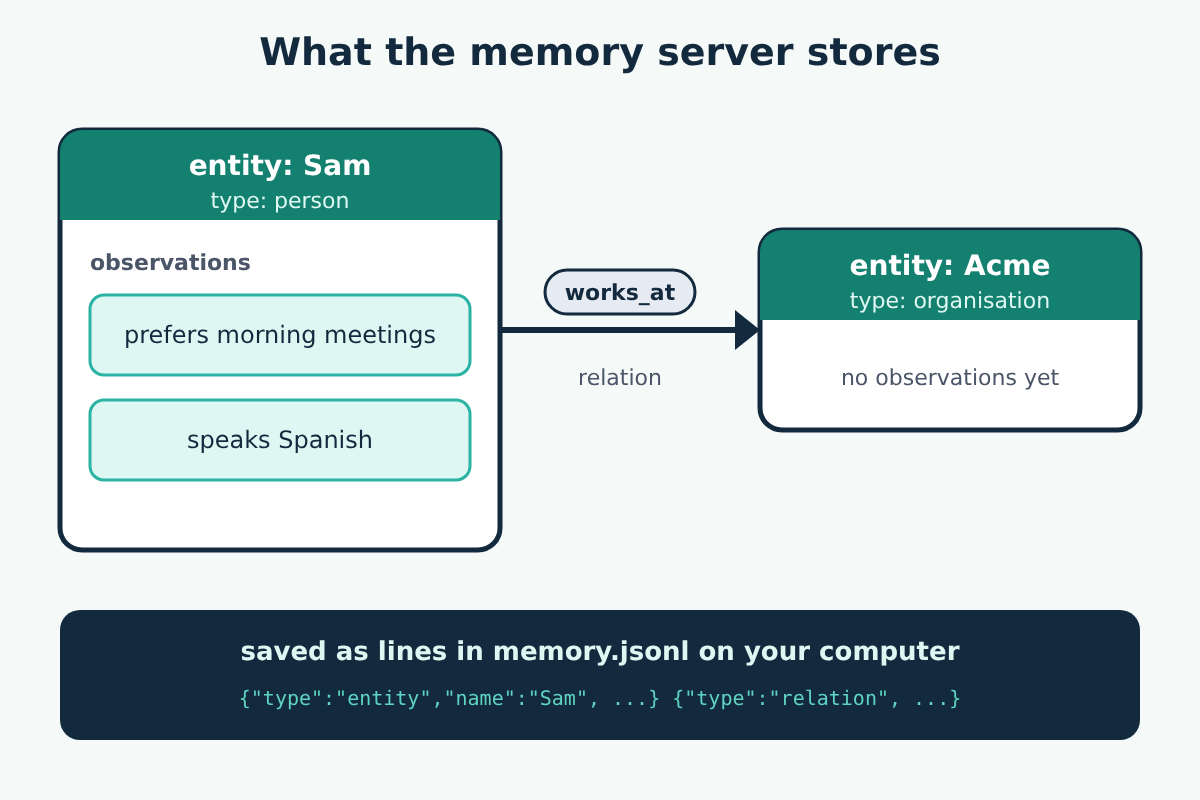
Everything is saved as JSON lines in one file, memory.jsonl. By default it sits in the server's own directory, which for an npx install is a package folder you'd never think to look in. Set its location yourself (below) so you know where your memories are.
What the server can do
An MCP tool is an action the model can ask to run, usually with your approval. The memory server has nine:
| Tool | What it does |
|---|---|
create_entities | Adds new entities; skips any whose name already exists and says which |
create_relations | Adds relations; fails if either entity is missing |
add_observations | Adds facts to an existing entity |
delete_entities | Removes entities and every relation that involves them |
delete_observations | Removes specific facts |
delete_relations | Removes specific relations |
read_graph | Returns the whole store |
search_nodes | Finds entities whose name, type or facts match a query |
open_nodes | Returns the named entities and the relations between them |
It also offers the whole store as an MCP resource, memory://knowledge-graph: data an app can read and attach as context, rather than an action. Apps that subscribe to it are told when the store changes.
Setting it up
You need Node.js 24 or later for the npx route. For Claude Desktop, add this to claude_desktop_config.json, with a path you choose for the memory file:
{
  "mcpServers": {
    "memory": {
      "command": "npx",
      "args": [
        "-y",
        "@modelcontextprotocol/server-memory"
      ],
      "env": {
        "MEMORY_FILE_PATH": "/path/to/custom/memory.jsonl"
      }
    }
  }
}
On Windows the README launches npx through cmd: set "command": "cmd" and put "/c" and "npx" at the start of args. Quit and reopen the app after saving.
For VS Code, add the same command and args under a servers key in your user mcp.json (Command Palette, MCP: Open User Configuration) or in .vscode/mcp.json in a workspace. A Docker image, mcp/memory, is also available and keeps the file in a Docker volume.
If the app reports that it can't start npx, see our fix for spawn npx ENOENT.
Upgrading from an older version
Older versions saved to memory.json. If you haven't set MEMORY_FILE_PATH and the server finds a memory.json but no memory.jsonl, it renames the old file at startup. If the rename fails, it stops with an error naming both paths instead of starting with an empty memory. Fix the cause, often a permissions problem, or set MEMORY_FILE_PATH to the file you want.
Tell the model how to use it
Connecting the server only makes the tools available. Whether the model saves anything, and what, depends on its instructions. The README's example is a set of custom instructions (it suggests the instructions field of a Claude Project) that tells the model to:
- assume it's talking to one user,
default_user; - start each chat by retrieving what's relevant from memory;
- watch for new facts in a few categories: identity, behaviours, preferences, goals and relationships;
- save them as entities, relations and observations.
That example collects a lot, including age, gender and location. Write your own version that lists only what you want kept, such as project names, decisions and preferences for how you like answers. A narrower list gives you a smaller, more useful memory and less personal data on disk.
Using one memory in several apps
Each AI app starts its own copy of the server, so two apps pointed at the same MEMORY_FILE_PATH are two programs writing one file. Version 2.0.1 handles that with a lock file next to the memory file, so writes take turns and none is lost. A write that can't get the lock within 60 seconds fails with an error rather than overwriting the file, and a lock left by a crashed server is cleared automatically. The folder holding the memory file must be writable. The README warns that a network drive that doesn't honour exclusive file creation can't be shared safely this way, so keep the file on a local disk.
What access it needs, and how to keep it safe
The server reads and writes one file and needs nothing else: no network, no credentials, no access to your other files. The risk is in what ends up inside that file.
- It's plain text. Anyone or anything that can read your user folder can read your memories. Don't let it store passwords, keys, health details or anything you wouldn't keep in an unencrypted note.
- Everything saved comes back as context. Facts in memory are fed to the model in later chats. If a web page or email the model read earlier contained instructions planted for it, and the model saved them as an observation, they return in every chat that retrieves that entity. Review the store now and then with
read_graph, or open the file, and delete what you don't recognise. - Approvals. Keep approval prompts on for the delete tools at least, so a confused model can't wipe entities in one call.
Limits worth knowing
- The README describes search as matching a query against names, types and fact text. It says nothing about matching by meaning, so name entities and write facts in the words you'll later search with.
create_entitieswon't add facts to an entity that already exists; the model has to useadd_observationsfor that, and the server tells it which names it skipped.- It's local only, so browser-based apps can't reach it, and memories don't follow you to another computer unless you move the file.
New to the terms here? Start with what MCP is and how hosts, clients and servers fit together.
