Local or remote MCP server? How to tell them apart and which to use
A local MCP server is a program your AI app runs on your computer; a remote one is a web address you sign in to. How to tell them apart and which to pick.
Checked against: the MCP specification, version 2026-07-28 (the current version on modelcontextprotocol.io at the time of writing), and the official guides "Connect to local MCP servers" and "Connect to remote MCP servers" for that version. Menu names in client apps change between releases, so check your app's own documentation for the exact clicks.
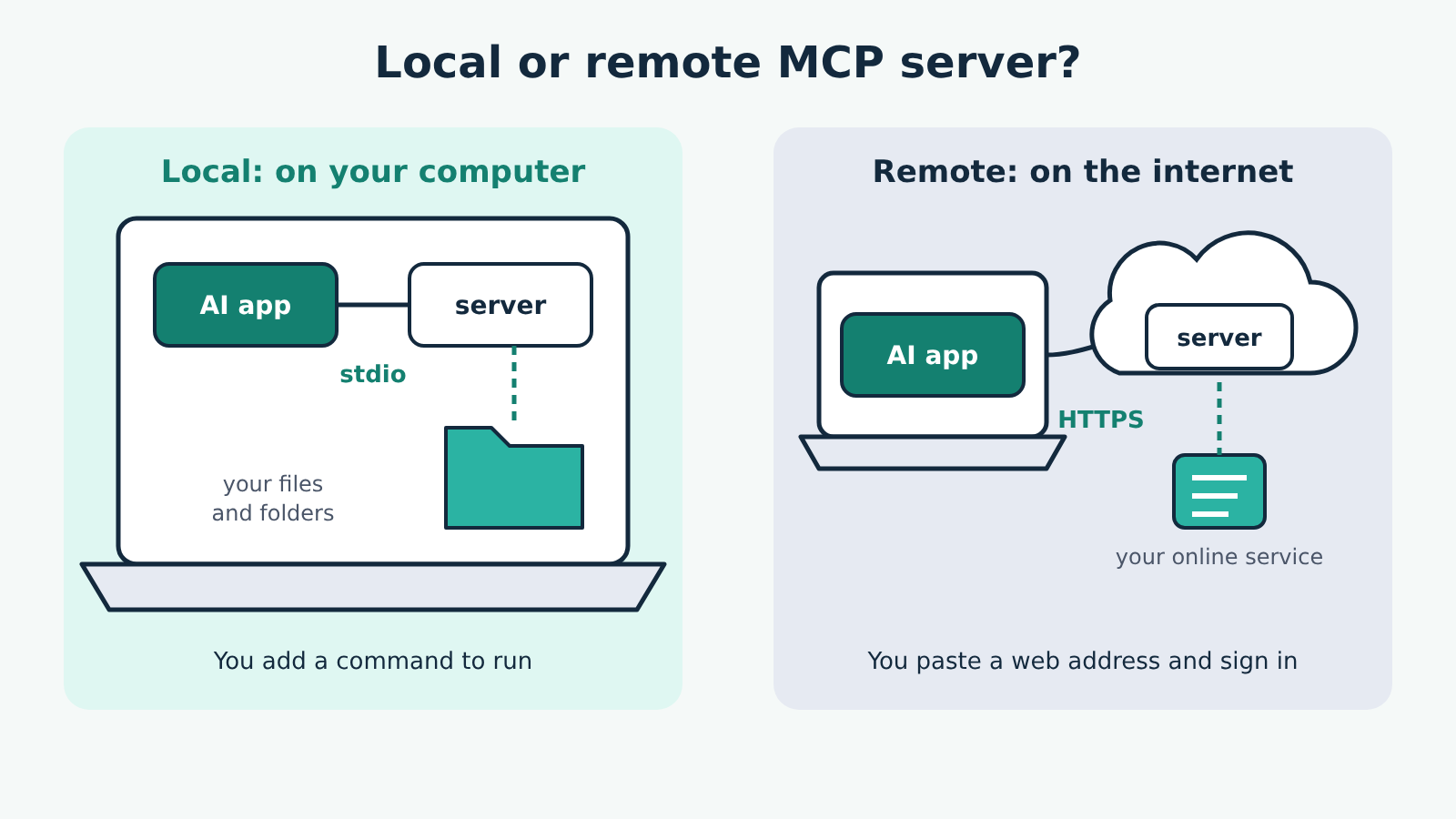
A local MCP server is a program your AI app starts on your own computer; a remote MCP server is a service on the internet that your AI app reaches at a web address. That one difference decides how you install it, where its passwords live, what it can reach, and which apps can use it. If the data you want is on your computer, you usually want a local server. If it lives in an online service, you usually want that service's remote server.
Two terms first. An MCP server is the small program or service that gives your AI app its tools (actions it can take, like "read a file" or "create an issue"). The client is the part of your AI app that talks to one server. The transport is how the two pass messages. If those are new, start with what MCP is and how hosts, clients and servers fit together.
How each one connects
The specification defines two standard transports, and they map almost exactly onto local and remote.
Local servers use stdio. The AI app launches the server as a separate program and sends it messages through that program's standard input; the server answers on its standard output. Nothing goes over the network. When you quit the app, it closes the server's input and the server is expected to exit.
Remote servers use Streamable HTTP. The server runs on its own at a single web address, its MCP endpoint (for example https://example.com/mcp), and every message from your app is a separate HTTP request to that address. One remote server can handle many client connections at once.
You may still see servers whose instructions mention an "SSE" endpoint. That's the older HTTP+SSE transport from the 2024-11-05 version of the specification, which Streamable HTTP replaced in 2025-03-26. Whether your app still connects to those depends on the app.
How to tell which one you have
You can tell from a server's setup instructions in a few seconds.
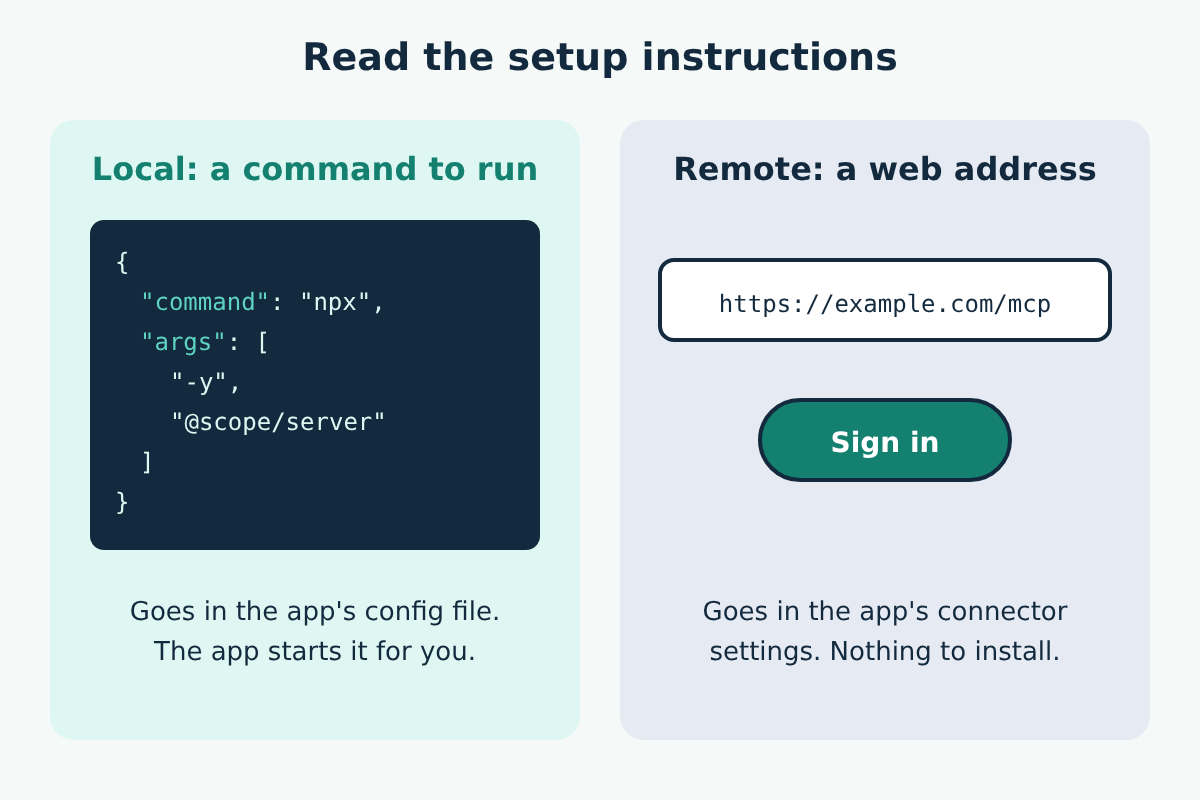
- A command and arguments means local. The instructions will show something like
"command": "npx"with a list of"args", or a command for another runtime. You add it to your app's configuration file, and the app runs it. - A URL means remote. You paste the address into your app's connector or server settings, and then usually sign in.
Here is the local example from the official guide, which adds the reference filesystem server to Claude Desktop through claude_desktop_config.json and lets it see two folders:
{
  "mcpServers": {
    "filesystem": {
      "command": "npx",
      "args": [
        "-y",
        "@modelcontextprotocol/server-filesystem",
        "/Users/username/Desktop",
        "/Users/username/Downloads"
      ]
    }
  }
}
For a remote server, the same guide uses Claude's custom connectors: open Settings, go to Connectors, choose to add a custom connector, paste the server's URL and follow its sign-in prompts. Other apps, such as Cursor or VS Code, have their own places for both kinds; the idea is the same.
The differences that matter day to day
| Local server | Remote server | |
|---|---|---|
| Where it runs | On your computer, started by your AI app | On someone's server on the internet |
| How you add it | A command and arguments in the app's config | A URL in the app's connector settings |
| What you need installed | The runtime it uses, often Node.js | Usually nothing |
| How it gets credentials | From its environment, set in your config | Usually a sign-in, often OAuth |
| What it can reach | Whatever your user account can reach, limited by its settings | Whatever the account you sign in with allows |
| Which apps can use it | Desktop and coding apps on that computer | Any app that supports remote servers, wherever you are |
Two rows deserve a closer look.
Credentials. The specification says local (stdio) servers should take credentials from their environment rather than through a sign-in flow, which is why local setups often ask you to put a token in an env section of the config. Remote servers that need authorization follow the specification's OAuth-based rules, so you sign in through a browser window and never handle the token yourself. In both cases the key belongs only in the place the server's documentation names, never pasted into a chat.
Failure modes. Local servers break in local ways: a missing runtime, a wrong path, or an app that can't find the program at all, which is behind errors like spawn npx ENOENT. Remote servers break in network ways: the address is wrong, the sign-in expired, or the service is down.
A server can be local and use HTTP
Some servers run on your computer but listen on a local web address instead of using stdio. For that case the specification tells servers to check the Origin header of every request and, when running locally, to listen only on localhost (127.0.0.1) rather than every network interface. Without those protections, a website you visit could use a trick called DNS rebinding to send requests to the server on your machine. If a local server's instructions tell you to expose it on all interfaces, treat that as a warning sign.
Safety note
A local server runs with your user account's permissions. The official guide says it plainly for the filesystem server: it can do any file operation you could do yourself in the folders you give it, so list only the folders it needs. Our filesystem server guide shows how to keep that list short.
A remote server gets whatever you approve when you sign in. Read the permissions it asks for, connect only to servers from sources you trust, and turn off tools you don't need in the connector settings where your app offers that.
Either kind can return text that tries to give your AI model instructions, such as a web page or email with hidden commands. That risk, prompt injection through tool output, doesn't depend on where the server runs, so keep approval prompts on for anything that sends, writes or deletes.
Which should you pick?
- Your files, local code or a database on your machine: a local server, limited to the folders or database it needs. The Memory MCP server is a simple example: it reads and writes one file on your computer and needs no account.
- An online service such as a project tracker or document store: that service's own remote server, if it offers one, so you sign in once and use it from any of your apps.
- You use your AI app in a browser or on your phone: a remote server. A web page can't start programs on your computer.
- Both are offered for the same service: the remote one is less to install; the local one keeps the connection on your machine and its token in your own config. Choose by which of those matters more to you.
